AWS & DevOps Roadmap 2026: The Complete Career and Skills Guide
If you’ve been scrolling through job portals lately, you’ve probably noticed the same phrase popping up again and again — “AWS DevOps Engineer.” In fact, it’s one of the most in-demand and best-paying roles in Indian IT right now, and that’s exactly why so many learners are searching for a reliable AWS DevOps course and placement in Bangalore to make the switch in 2026.
This guide lays out a complete, realistic roadmap for learning AWS and DevOps in 2026 — the tools you need, the order in which to learn them, the projects that actually get you noticed, and the career path from fresher to senior cloud engineer. In other words, whether you’re a final-year student, a working professional wanting to switch domains, or a developer trying to future-proof your career, this is written to answer every question you’re likely to have along the way.
Why AWS & DevOps Demand Is Growing in 2026
Cloud adoption in India isn’t slowing down. Enterprises across banking, retail, healthcare, and product startups are migrating workloads to AWS and rebuilding their release pipelines around DevOps practices. As a result, that combination — cloud infrastructure plus automated software delivery — has created a hiring wave that shows no signs of stopping. In short, companies aren’t just looking for people who know a bit of AWS; they want engineers who understand the full lifecycle: provisioning infrastructure, automating deployments, monitoring systems, and keeping everything secure and scalable.
For learners in Bangalore specifically, this demand is even more visible. For example, the city hosts a dense cluster of product companies, GCCs (Global Capability Centres), and service-based IT firms, all of which run substantial AWS footprints. That’s exactly why structured AWS DevOps course and placement in Bangalore programs have become such a popular entry point — they combine hands-on tool training with the kind of interview preparation and placement support that self-study alone rarely provides.
What Is AWS & DevOps
AWS (Amazon Web Services) is a cloud computing platform that provides on-demand computing power, storage, networking, and application services over the internet, so businesses don’t need to own and maintain physical servers.
DevOps is a culture and set of practices that unites software development (Dev) and IT operations (Ops) to shorten the software delivery lifecycle, automate repetitive tasks, and enable continuous integration and continuous delivery (CI/CD).
When combined, AWS + DevOps refers to the practice of using AWS’s cloud services — EC2, S3, IAM, and others — alongside DevOps tools and principles to build, test, deploy, and monitor applications faster and more reliably.
A Brief History and Evolution
DevOps emerged around 2009 as a response to the friction between development teams (who wanted to ship fast) and operations teams (who wanted stability). The “DevOpsDays” conference in Belgium is often credited as the movement’s starting point.
AWS, launched in 2006, was one of the first major public cloud platforms and effectively created the market for Infrastructure as a Service (IaaS). Over the following decade, as AWS’s service catalog expanded into containers, serverless computing, and managed Kubernetes, it became the natural home for DevOps practices to run at scale.
By the early 2020s, the two had merged into a single, coherent discipline. Today, very few DevOps roles exist without a cloud platform attached, and AWS remains the most widely adopted choice among Indian employers, according to multiple industry hiring reports.
Why It Matters Today
Modern applications are expected to be deployed multiple times a day, scale automatically under load, recover from failure without manual intervention, and remain secure against constant threats. None of that is realistically achievable through manual server management. AWS DevOps skills give engineers the ability to automate all of it — which is precisely why this combination has become foundational, not optional, for IT careers, and why a well-structured AWS DevOps course and placement in Bangalore is often the fastest way to build these skills correctly the first time.
How Does It Work
At a high level, an AWS DevOps workflow follows a repeatable cycle. Here’s a simplified text description of that pipeline:
Developer commits code (GitHub/GitLab)
↓
CI Tool triggers build (Jenkins/GitHub Actions)
↓
Automated tests run
↓
Docker image built and pushed to registry (ECR)
↓
Infrastructure provisioned via Terraform/CloudFormation
↓
Deployment to EC2/EKS/ECS (via CodeDeploy or Kubernetes)
↓
Monitoring & Logging (CloudWatch, Prometheus, Grafana)
↓
Feedback loop back to developers
Step-by-Step Explanation
- Code Commit: A developer pushes code changes to a version control system like Git.
- Continuous Integration: A CI tool (Jenkins, GitHub Actions, or AWS CodePipeline) automatically builds the application and runs unit tests.
- Containerization: The application is packaged into a Docker image so it runs consistently across environments.
- Infrastructure Provisioning: Terraform or AWS CloudFormation scripts create the required cloud resources — VPCs, EC2 instances, load balancers — in a repeatable, version-controlled way.
- Continuous Deployment: The new build is deployed automatically to staging or production using tools like AWS CodeDeploy or a Kubernetes rollout.
- Monitoring: CloudWatch, Prometheus, and Grafana track application health, resource usage, and errors in real time.
- Feedback and Iteration: Alerts and dashboards inform the team of issues, closing the loop so the next release is even better.
Example: For instance, imagine an e-commerce company pushing a new checkout feature. Instead of manually copying files to a server at midnight, their pipeline automatically tests the change, builds a container, deploys it to a Kubernetes cluster running on AWS EKS, and rolls it back within seconds if error rates spike. Ultimately, that’s the practical value of this workflow.
Features
- Infrastructure as Code (IaC): Define servers, networks, and services using code instead of manual configuration.
- Continuous Integration/Continuous Delivery (CI/CD): Automated build, test, and release pipelines.
- Auto Scaling: AWS automatically adds or removes compute resources based on real-time demand.
- High Availability: Applications spread across multiple Availability Zones to avoid downtime.
- Managed Container Orchestration: Services like EKS and ECS handle Kubernetes and Docker container management.
- Centralized Identity and Access Management (IAM): Fine-grained permission control across teams and services.
- Built-in Monitoring and Logging: CloudWatch, CloudTrail, and X-Ray provide observability out of the box.
- Serverless Computing: AWS Lambda lets teams run code without provisioning servers at all.
Advantages
- Faster Release Cycles: Teams can ship updates several times a day instead of once every few weeks.
- Cost Efficiency: Pay-as-you-go pricing avoids the capital expense of physical data centers.
- Scalability on Demand: Applications automatically handle traffic spikes, such as festive-season shopping surges.
- Improved Reliability: Automated rollback and self-healing infrastructure reduce outages.
- Better Collaboration: Shared pipelines and dashboards break down silos between developers and operations teams.
- Global Reach: AWS’s data centers across multiple regions let Indian companies serve international customers with low latency.
Limitations
- Learning Curve: The sheer number of AWS services can overwhelm beginners without a structured roadmap.
- Cost Management Complexity: Poorly configured auto-scaling or unused resources can lead to unexpectedly high bills.
- Security Risks: Misconfigured IAM roles or public S3 buckets remain a leading cause of cloud data breaches.
- Vendor Lock-In: Heavy reliance on AWS-specific services can make migrating to another cloud provider difficult later.
- Tooling Overhead: Maintaining CI/CD pipelines, container clusters, and IaC scripts requires ongoing engineering effort.
Architecture
A typical production-grade AWS DevOps architecture includes:
- VPC (Virtual Private Cloud): Isolated network environment for your resources.
- EC2 Instances / EKS Cluster: Compute layer running your application or containers.
- Application Load Balancer: Distributes incoming traffic across healthy instances.
- S3 Buckets: Object storage for static assets, logs, and backups.
- IAM Roles and Policies: Control who and what can access each resource.
- RDS or DynamoDB: Managed database layer.
- CloudWatch: Centralized logging and alerting.
- Route 53: DNS management and traffic routing.
Ultimately, this layered architecture ensures that compute, storage, networking, and security are handled as separate, manageable components — a principle that mirrors good DevOps design itself.
Tools Used
Every well-designed AWS DevOps course and placement in Bangalore builds its syllabus around the same core toolchain that companies actually use in production. In particular, here’s a breakdown of what each tool does, where it shines, and where it falls short:
| Tool | Purpose | Advantage | Disadvantage | Industry Usage |
| EC2 | Virtual servers | Flexible compute sizing | Manual patching needed | Hosting apps, backend services |
| S3 | Object storage | Extremely durable, cheap | Not for structured queries | Static sites, backups, data lakes |
| IAM | Access management | Granular permission control | Misconfiguration risk | Security across all AWS accounts |
| Docker | Containerization | Consistent environments | Image bloat if unmanaged | Microservices packaging |
| Kubernetes (EKS) | Container orchestration | Auto-healing, scaling | Steep learning curve | Large-scale microservices |
| Terraform | Infrastructure as Code | Cloud-agnostic, version-controlled | Requires state management discipline | Provisioning environments |
| Jenkins | CI/CD automation | Highly customizable, plugin-rich | Needs maintenance overhead | Build/test/deploy pipelines |
| CloudWatch | Monitoring & logging | Native AWS integration | Can get costly at scale | Alerts, dashboards, log analysis |
Installation / Setup Guide
- Create an AWS Free Tier account at aws.amazon.com.
- Install the AWS CLI on your machine and configure it using aws configure with your access keys.
- Install Docker Desktop to build and run containers locally.
- Install Terraform using your OS package manager or by downloading the binary from HashiCorp.
- Install Jenkins either via Docker or directly on an EC2 instance for pipeline practice.
- Set up a GitHub repository to version-control your application and IaC scripts.
- Create an IAM user with limited permissions instead of using root credentials, following AWS security best practices.
Step-by-Step Tutorial: Beginner to Advanced
Beginner Stage
- Learn Linux basics and shell scripting — most AWS operations happen through the command line.
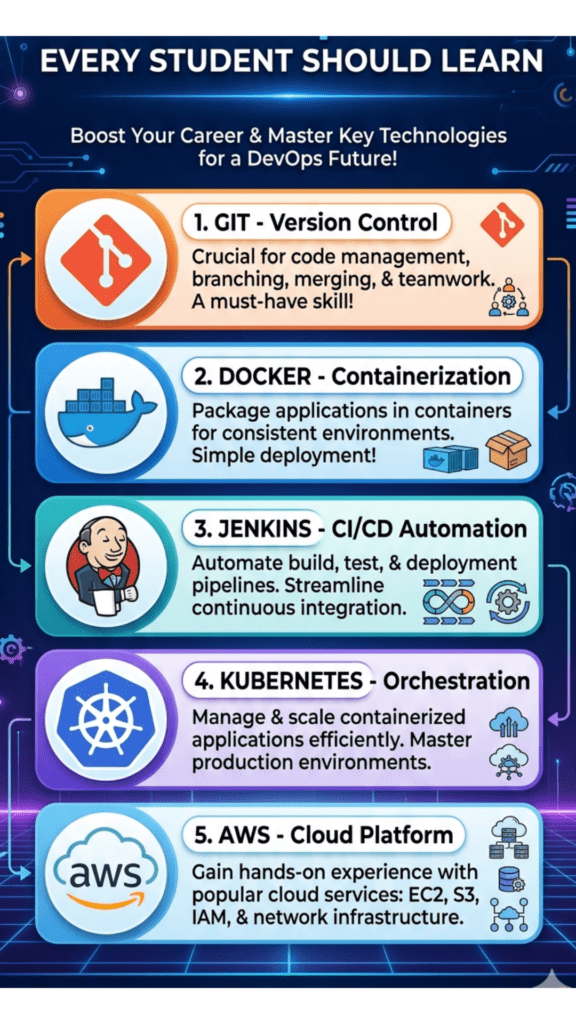
- Understand core AWS services: EC2, S3, VPC, and IAM.
- Learn Git and GitHub for version control.
Intermediate Stage 4. Learn Docker: build images, write Dockerfiles, and run multi-container apps with Docker Compose. 5. Learn a CI/CD tool — start with Jenkins or GitHub Actions — and build your first automated pipeline. 6. Learn Terraform basics to provision a simple EC2 instance through code.
Advanced Stage 7. Learn Kubernetes fundamentals and deploy your first application to an EKS cluster. 8. Implement monitoring using CloudWatch and Prometheus/Grafana. 9. Practice building a complete CI/CD pipeline: code commit → build → test → containerize → deploy to EKS → monitor. 10. Learn AWS security best practices, including least-privilege IAM policies and secrets management with AWS Secrets Manager.
Real-World Applications
- Healthcare: Hospitals use AWS to store and process patient data securely while meeting compliance requirements, with DevOps pipelines enabling rapid updates to telemedicine platforms.
- Finance & Banking: Banks run fraud-detection systems on auto-scaling AWS infrastructure, with strict CI/CD gates for regulatory compliance.
- Retail: E-commerce platforms use auto-scaling EC2 fleets to handle festive sale traffic spikes without downtime.
- Manufacturing: IoT sensor data from factory floors is ingested and processed using AWS services combined with automated deployment pipelines.
- Government: Public-sector digital services run on AWS GovCloud-style setups with DevOps practices ensuring uptime for citizen services.
- Education: EdTech platforms scale video-streaming infrastructure during exam seasons using AWS auto-scaling.
- Cloud-Native Startups: Startups build entirely on AWS from day one, using DevOps automation to compensate for small engineering teams.
- AI/ML: Machine learning pipelines use AWS SageMaker alongside DevOps practices (MLOps) to automate model training and deployment.
Latest Trends in 2026
- AI-Assisted DevOps (AIOps): AI-driven tools are increasingly used to predict failures, auto-remediate issues, and optimize resource allocation before humans even notice a problem.
- Platform Engineering: Many organizations are building internal developer platforms (IDPs) on top of AWS to give development teams self-service infrastructure without needing deep DevOps knowledge.
- GitOps Adoption: Teams are increasingly managing infrastructure and deployments entirely through Git repositories, using tools like ArgoCD alongside Kubernetes.
- FinOps Integration: Cloud cost optimization has become a core DevOps responsibility, not just a finance team concern.
- Serverless-First Architectures: More teams are defaulting to AWS Lambda and Fargate to reduce operational overhead.
- Security-as-Code (DevSecOps): Security scanning is being embedded directly into CI/CD pipelines rather than treated as a separate, later step.
In short, these shifts mean that a strong 2026 roadmap has to go beyond “learn EC2 and Jenkins” — it must also cover automation-first thinking, cost awareness, and security integration from day one.
Career Opportunities
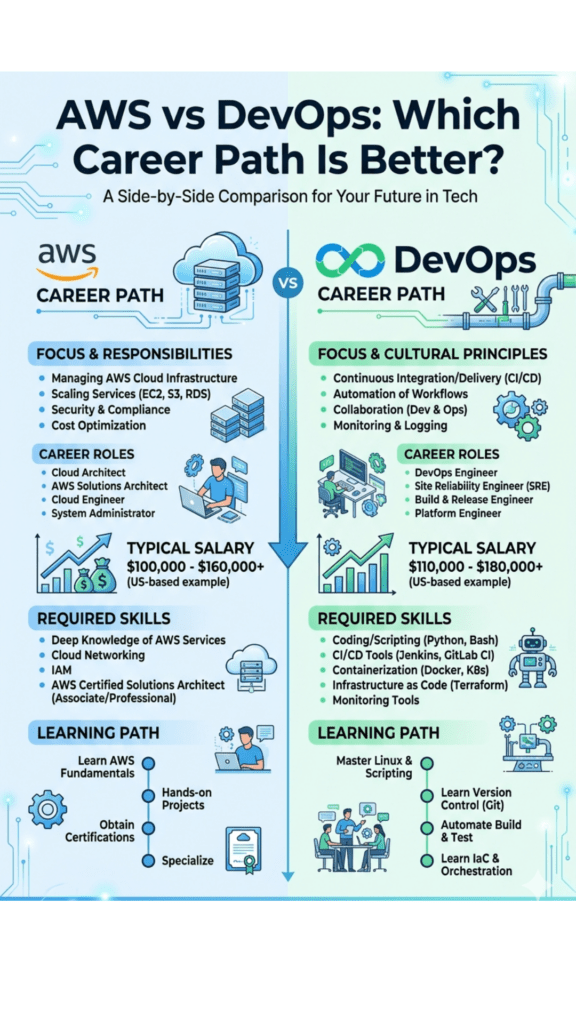
Required Skills
- Linux administration and shell scripting
- AWS core services (EC2, S3, VPC, IAM, RDS)
- Docker and Kubernetes
- CI/CD tools (Jenkins, GitHub Actions, GitLab CI)
- Infrastructure as Code (Terraform, CloudFormation)
- Monitoring tools (CloudWatch, Prometheus, Grafana)
- Scripting languages (Python or Bash)
- Basic networking and security concepts
Job Roles
- DevOps Engineer
- AWS Cloud Engineer
- Site Reliability Engineer (SRE)
- Cloud Infrastructure Engineer
- Build and Release Engineer
- Platform Engineer
- Cloud Security Engineer
Salary in India (Approximate, Industry-Wide Estimates)
| Experience Level | Approximate Annual Salary (INR) |
| Fresher (0–1 yr) | ₹4–7 LPA |
| 2–4 years | ₹8–15 LPA |
| 5–8 years | ₹16–28 LPA |
| 8+ years / Lead roles | ₹30 LPA and above |
Note: Of course, figures vary by company, city, and negotiation; treat these as indicative ranges rather than guarantees.
Salary Abroad (Indicative)
- USA: Roughly $95,000–$150,000 per year for mid-to-senior DevOps engineers.
- UK: Roughly £45,000–£80,000 per year.
- UAE/Middle East: Roughly AED 12,000–22,000 per month for experienced professionals.
Top Hiring Companies
Specifically, Amazon, Accenture, TCS, Infosys, Wipro, Cognizant, Capgemini, HCLTech, product startups, and numerous GCCs based in Bangalore hire actively for AWS DevOps roles.
Career Roadmap
Fresher / Junior DevOps Engineer
↓ (1–2 years)
DevOps Engineer / Cloud Engineer
↓ (2–4 years)
Senior DevOps Engineer / SRE
↓ (5+ years)
DevOps Architect / Platform Lead
↓
Cloud/DevOps Manager or Principal Engineer
Projects
Beginner
- Host a static website on AWS S3 with Route 53 domain mapping.
- Launch and configure an EC2 instance running a simple Node.js or Flask app.
Intermediate
- Build a CI/CD pipeline with Jenkins that automatically builds and deploys a Dockerized app to EC2.
- Provision a complete VPC with public/private subnets using Terraform.
Advanced
- Deploy a microservices application on AWS EKS with auto-scaling and load balancing.
- Implement a full GitOps workflow using ArgoCD on top of Kubernetes.
Industry-Level / Portfolio Projects
- Build a three-tier application (frontend, backend, database) with a complete CI/CD pipeline, monitoring dashboard, and cost-optimized auto-scaling policy — the kind of end-to-end project recruiters specifically look for on a resume.
Interview Questions (20 Commonly Asked)
- What is the difference between AWS EC2 and AWS Lambda?
- How does Auto Scaling work in AWS?
- What is the difference between an IAM Role and an IAM User?
- Explain the difference between Docker and Kubernetes.
- What is a CI/CD pipeline, and why is it important?
- How do you manage secrets in a DevOps pipeline?
- What is Infrastructure as Code, and why use Terraform over manual provisioning?
- Explain the difference between horizontal and vertical scaling.
- What is a Blue-Green deployment strategy?
- How does AWS S3 differ from EBS?
- What is the purpose of a VPC in AWS?
- How would you troubleshoot a failed Jenkins build?
- What is the difference between Continuous Delivery and Continuous Deployment?
- Explain how Kubernetes handles self-healing.
- What is CloudFormation, and how does it compare to Terraform?
- How do you monitor application performance on AWS?
- What is the shared responsibility model in AWS security?
- How do you roll back a failed deployment?
- What are AWS Availability Zones and Regions?
- Describe a real DevOps pipeline you have built or worked on.
Best Certifications
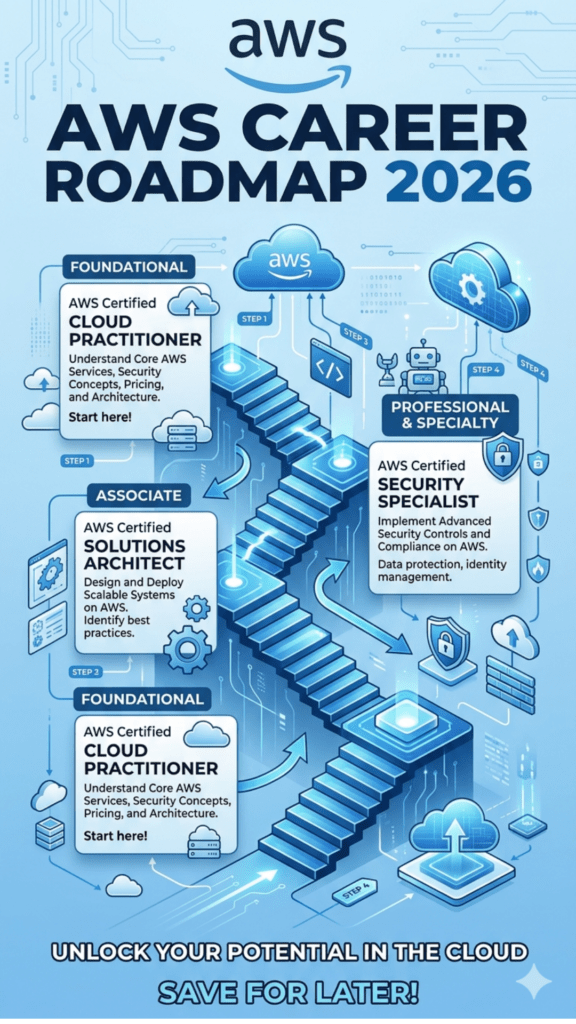
- AWS Certified Cloud Practitioner (foundational, good starting point)
- AWS Certified Solutions Architect – Associate
- AWS Certified DevOps Engineer – Professional
- Certified Kubernetes Administrator (CKA)
- HashiCorp Certified: Terraform Associate
- Docker Certified Associate
Learning Resources
- Official Documentation: AWS Documentation (docs.aws.amazon.com), Kubernetes Documentation (kubernetes.io/docs), Terraform Documentation (developer.hashicorp.com/terraform)
- Books: AWS Certified Solutions Architect Study Guide, The Phoenix Project (for DevOps culture), Kubernetes Up & Running
- Communities: AWS re:Post, DevOps subreddit, CNCF Slack community
- GitHub: Explore public Terraform modules and Kubernetes manifests to study real configurations
- Practice Platforms: AWS Free Tier, Katacoda-style interactive labs, Play with Docker, Play with Kubernetes
Comparison Table: AWS DevOps vs Alternative Career Paths
| Career Path | Core Focus | Average Entry Salary (India) | Demand in Bangalore |
| AWS DevOps Engineer | Cloud infra + automation | ₹4–7 LPA | Very High |
| Azure DevOps Engineer | Microsoft cloud ecosystem | ₹4–6.5 LPA | High |
| Traditional System Administrator | On-prem server management | ₹3–5 LPA | Declining |
| Backend Developer (no DevOps) | Application logic only | ₹4–6 LPA | High, but less cross-functional |
| Site Reliability Engineer | Reliability + automation | ₹6–9 LPA | Growing rapidly |
Frequently Asked Questions
General AWS & DevOps Questions
1. What is the AWS DevOps roadmap for 2026? The roadmap starts with Linux and Git fundamentals, moves into core AWS services, then covers Docker, CI/CD tools, Terraform, Kubernetes, and finally monitoring and security — building from basic infrastructure knowledge to full pipeline automation.
2. Is AWS DevOps a good career in 2026? Yes. Cloud adoption and automation-first engineering practices continue to grow across Indian and global companies, keeping demand for AWS DevOps professionals consistently high.
3. Do I need coding experience to learn DevOps? Basic scripting knowledge (Python or Bash) is helpful, but you don’t need to be an expert programmer. In fact, strong Linux and automation fundamentals matter more than deep coding skills.
4. How long does it take to learn AWS and DevOps? With consistent effort, most learners can build job-ready skills in 4 to 6 months through a structured course, or, alternatively, longer through self-study alone.
5. What is the difference between DevOps and Cloud Computing? Cloud computing refers to on-demand infrastructure services (like AWS), while DevOps is a methodology for automating and streamlining software delivery — in other words, the two work together but are not the same thing.
Salary, Certification & Career Questions
6. What is the salary of a DevOps Engineer in Bangalore? Freshers typically start around ₹4–7 LPA, while, in comparison, experienced engineers with 5+ years can earn ₹20 LPA or more, depending on the company and skill depth.
7. Which is better, AWS or Azure, for a DevOps career? AWS has a larger market share and more job openings in India currently, but both platforms use very similar DevOps principles, so, as a result, skills transfer easily between them.
8. Do I need an AWS certification to get a job? Certifications aren’t mandatory, but, nonetheless, they strengthen your resume and validate your knowledge, especially for freshers competing against experienced candidates.
9. Can a fresher get an AWS DevOps job directly? Yes, especially with strong hands-on projects, relevant certifications, and interview preparation — a structured AWS DevOps course and placement in Bangalore is built specifically to help freshers close this gap.
10. What is the career growth path after becoming a DevOps Engineer? Typically, a path moves from Junior DevOps Engineer to Senior Engineer/SRE, then to DevOps Architect or Platform Lead, and eventually into engineering management roles.
Tools & Training Questions
11. What tools should I learn first for DevOps in 2026? First, start with Linux, Git, and Docker, then move to a CI/CD tool like Jenkins, followed by Terraform and Kubernetes.
12. Is Kubernetes necessary for a DevOps role? Increasingly, it’s expected for mid-to-senior roles, since most modern companies run containerized applications at scale.
13. What is the best way to learn AWS DevOps practically? Build real projects — host applications, set up CI/CD pipelines, and provision infrastructure with Terraform — rather than only watching video tutorials.
14. Where can I find an AWS DevOps course and placement in Bangalore? Ascent Software Training Institute, located in BTM Layout, Bangalore, offers a structured AWS DevOps course and placement in Bangalore that combines hands-on labs, live projects, and dedicated placement support.
15. What is the average course duration for AWS DevOps training? Generally, most structured programs run between 3 to 6 months, depending on whether classes are part-time or full-time.
AWS DevOps Course and Placement in Bangalore: Why Structured Training Helps
Self-study can take you a long way with AWS and DevOps, but most learners eventually hit the same wall: it’s hard to know which projects actually impress recruiters, and even harder to get real interview practice on your own. Because of this, this is exactly the gap a good AWS DevOps course and placement in Bangalore is designed to close.
Specifically, a structured program gives you three things self-study rarely offers on its own:
- Sequenced learning: Instead of jumping between random YouTube tutorials, you follow the same Linux → AWS → Docker → CI/CD → Terraform → Kubernetes progression covered in this roadmap, taught in order, with hands-on labs at each stage.
- Feedback from working professionals: Trainers who currently work in the industry can tell you exactly what recruiters in Bangalore are screening for right now — not what was true three years ago.
- A direct path to interviews: Placement assistance, resume reviews, and mock interviews compress the gap between “I’ve learned the tools” and “I’ve been hired to use them.”
If you’re evaluating options in the city, Ascent Software Training Institute in BTM Layout runs one such AWS DevOps course and placement in Bangalore, built around this exact roadmap.
Conclusion
AWS and DevOps have moved well past being “nice to have” skills — they’re now core requirements for a huge share of modern IT roles. Overall, the 2026 roadmap outlined here — Linux and Git fundamentals, core AWS services, Docker, CI/CD, Terraform, Kubernetes, and monitoring — gives you a realistic, structured path rather than a scattered list of buzzwords.
What matters most isn’t memorizing every AWS service. Instead, it’s building genuine hands-on comfort with the tools that show up in real pipelines every day, backed by projects you can confidently explain in an interview.
If you’re looking to fast-track this journey with expert guidance rather than navigating it entirely alone, our AWS DevOps course and placement in Bangalore at Ascent Software Training Institute, BTM Layout, is built around exactly this roadmap. Specifically, the program includes live, industry-relevant projects, training from working industry professionals, dedicated placement assistance, resume building support, mock interviews, and internship opportunities — with both online and offline batches available for working professionals and students alike.
Whether you’re just starting out or upgrading your existing skill set, structured AWS training and placement in Bangalore with real mentorship can significantly shorten the distance between where you are now and your first (or next) DevOps role.