

You are currently viewing Django REST Framework Tutorial (2026): Step-by-Step API
Live classroom session at our BTM Layout campus, part of Bangalore's best data analyst training institute.

Django REST Framework Tutorial: Build a Real, Secure API from Scratch (2026)

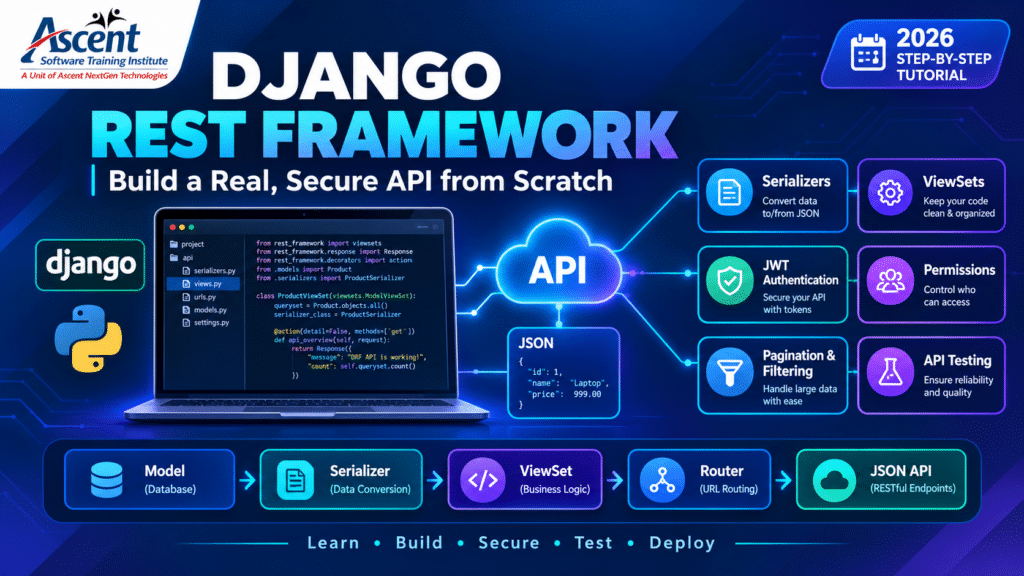
Looking for a practical Django REST Framework tutorial? This step-by-step guide shows you how to build a real and secure REST API from scratch. You’ll learn how serializers, ViewSets, routers, JWT authentication, permissions, pagination, filtering, and API testing work together in a Django application. You’ll also learn how to serve a machine learning model through a REST API.

Django REST Framework tutorial showing secure API development with serializers, ViewSets, JWT authentication and testing

Django REST Framework (DRF) is the standard toolkit for building JSON APIs on Django. You define a model, write a serializer to convert and validate its data, and expose it with a ViewSet and a router. Add JWT authentication, permissions, pagination and tests, and you have a solid API in well under 100 lines of application code.

Which path fits you? Aiming for a backend or web developer role? Keep reading, then see Python full stack training in BTM Layout. Aiming for data or ML roles? Jump to serving a model with DRF, then browse Ascent’s job-oriented courses, which include data science.

In this guide: What is DRF · Request flow · DRF vs FastAPI · Prerequisites · Setup · Models and serializers · ViewSets · Auth · Permissions · Pagination · Tests · Errors · Mistakes · ML serving · Courses · Jobs · Practice plan · FAQs

Key takeaways

  • If you’re aiming at Python web roles, learn DRF first. Many existing Django codebases use it.
  • The core loop is model → serializer → ViewSet → router. Auth, permissions, pagination and tests turn a demo into something you can defend in a code review.
  • Beginner mistakes that matter most are security and performance ones: exposed fields, client-set ownership, N+1 queries.
  • A tested, deployed API you can explain is stronger evidence of skill than a list of certificates.

What Is Django REST Framework? A Practical Tutorial Overview

Django REST Framework is a toolkit built on Django for creating web APIs. It converts database objects into JSON (serialization), validates incoming data, handles authentication and permissions, and routes URLs to logic. You write far less code than building a JSON API by hand.

Think of Django as the kitchen and DRF as the ordering counter. A React app, mobile app or another service places a structured order (an HTTP request) and gets a structured response, usually JSON. The official DRF documentation is the definitive reference.

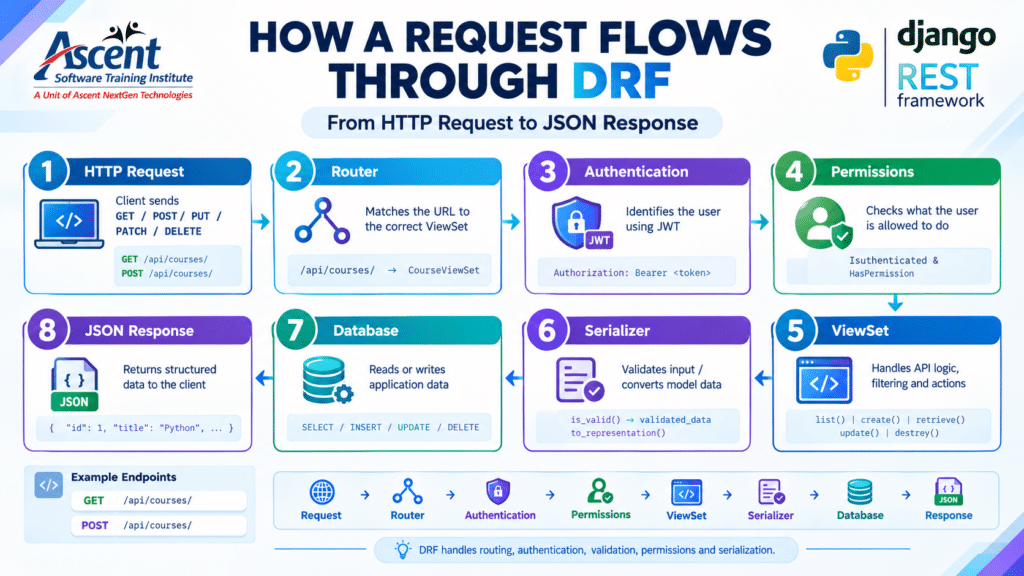
How Does a Django REST Framework API Request Flow?

Django REST Framework request flow from HTTP request through router authentication permissions serializer database and JSON response

Is DRF still worth learning in 2026?

Yes, if you’re heading for Python web work. In practice, DRF is common in existing Django projects and works well for Python API development. Meanwhile, FastAPI suits async-first services and ML endpoints. By contrast, DRF fits full applications that need Django’s admin, ORM and mature authentication.

Factor

Django REST Framework

FastAPI

Django Ninja

Built on

Django

Starlette + Pydantic

Django + Pydantic

Best for

Full apps, admin panels, existing Django projects

High-concurrency services, ML endpoints

Django projects wanting FastAPI-style syntax

ORM included

Yes

No (add SQLAlchemy etc.)

Yes

Auth/permissions

Extensive built-in system

Basic tools; you assemble the rest

Basic

API docs UI

Browsable API (OpenAPI via add-on)

Swagger/OpenAPI built in

Swagger/OpenAPI built in

Learning curve

Moderate

Low to moderate

Low

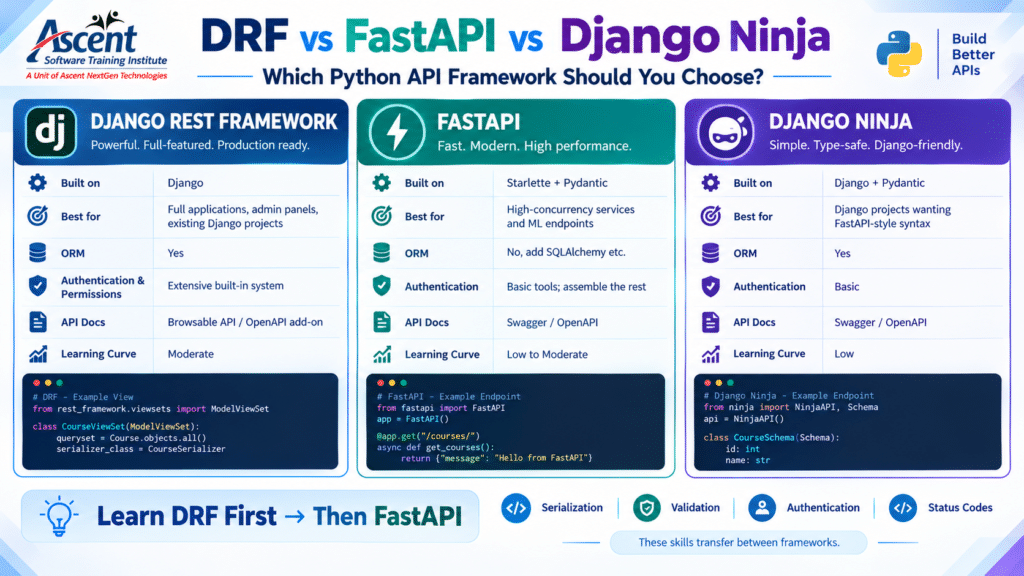
Learn DRF first, then FastAPI. Serialization, validation, auth and status codes transfer directly.

Django REST Framework vs FastAPI vs Django Ninja comparison for Python API development

What Should You Know Before Starting a Django REST Framework Tutorial?

Before starting, you should know Python basics such as functions, classes and dictionaries. You should also understand core Django concepts, including models, migrations, URLs and views. In addition, learn HTTP fundamentals such as GET, POST, PUT, PATCH and DELETE, along with status codes such as 200, 201, 400, 401, 403 and 404. Finally, basic terminal and Git skills will help.

If “migration” or “foreign key” is unfamiliar, work through Django’s official polls tutorial first. Learners who skip it often debug Django problems while believing they’re DRF problems.

How to Set Up Django REST Framework for Your API

Create a virtual environment, install Django and DRF, start a project and an app, then add rest_framework to INSTALLED_APPS. Everything else is optional configuration.

bash

python -m venv venv

source venv/bin/activate        # Windows: venv\Scripts\activate

pip install “django>=5.2,<5.3” djangorestframework djangorestframework-simplejwt django-filter

django-admin startproject config .

python manage.py startapp courses

pip freeze > requirements.txt

python

# config/settings.py

INSTALLED_APPS = [

    # …default Django apps…

    “rest_framework”,

    “django_filters”,

    “courses”,

]

Pin versions in requirements.txt. Unpinned dependencies are a common reason “it worked on my laptop” fails at deployment.

How do you create a model and serializer in DRF?

A model defines the database table. A serializer defines how a model instance becomes JSON and how incoming JSON is validated before saving. ModelSerializer generates fields from the model, so you write validation rules instead of boilerplate.

python

# courses/models.py

from django.conf import settings

from django.db import models


class Course(models.Model):

    class Level(models.TextChoices):

        BEGINNER = “beginner”, “Beginner”

        INTERMEDIATE = “intermediate”, “Intermediate”


    title = models.CharField(max_length=200)

    level = models.CharField(max_length=20, choices=Level.choices, default=Level.BEGINNER)

    duration_weeks = models.PositiveIntegerField()

    created_by = models.ForeignKey(

        settings.AUTH_USER_MODEL, on_delete=models.CASCADE, related_name=“courses”

    )

    created_at = models.DateTimeField(auto_now_add=True)


    def __str__(self):

        return self.title

python

# courses/serializers.py

from rest_framework import serializers

from .models import Course


class CourseSerializer(serializers.ModelSerializer):

    class Meta:

        model = Course

        fields = [“id”, “title”, “level”, “duration_weeks”, “created_by”, “created_at”]

        read_only_fields = [“id”, “created_by”, “created_at”]


    def validate_duration_weeks(self, value):

        if value < 1:

            raise serializers.ValidationError(“Duration must be at least 1 week.”)

        return value

Run python manage.py makemigrations courses && python manage.py migrate.

created_by is read-only on purpose. Clients must never choose who owns a record; the server sets it from the logged-in user. Letting clients set ownership is a real security bug in beginner projects.

What is a ViewSet, and how do routers create URLs?

A ViewSet groups related actions (list, retrieve, create, update, delete) in one class. A router generates the URL patterns. ModelViewSet plus DefaultRouter gives you full CRUD in roughly ten lines.

python

# courses/permissions.py

from rest_framework import permissions


class IsOwnerOrReadOnly(permissions.BasePermission):

    def has_object_permission(self, request, view, obj):

        if request.method in permissions.SAFE_METHODS:

            return True

        return obj.created_by == request.user

python

# courses/views.py

from rest_framework import viewsets

from rest_framework.permissions import IsAuthenticatedOrReadOnly

from .models import Course

from .permissions import IsOwnerOrReadOnly

from .serializers import CourseSerializer


class CourseViewSet(viewsets.ModelViewSet):

    queryset = Course.objects.select_related(“created_by”).order_by(“-created_at”)

    serializer_class = CourseSerializer

    permission_classes = [IsAuthenticatedOrReadOnly, IsOwnerOrReadOnly]

    filterset_fields = [“level”]

    search_fields = [“title”]

    ordering_fields = [“created_at”, “duration_weeks”]

    # Filter backends are set globally in settings (below).


    def perform_create(self, serializer):

        serializer.save(created_by=self.request.user)

python

# config/urls.py

from django.contrib import admin

from django.urls import path, include

from rest_framework.routers import DefaultRouter

from rest_framework_simplejwt.views import TokenObtainPairView, TokenRefreshView

from courses.views import CourseViewSet


router = DefaultRouter()

router.register(“courses”, CourseViewSet, basename=“course”)


urlpatterns = [

    path(“admin/”, admin.site.urls),

    path(“api/”, include(router.urls)),

    path(“api/token/”, TokenObtainPairView.as_view()),

    path(“api/token/refresh/”, TokenRefreshView.as_view()),

]

You now have:

  • GET /api/courses/: list
  • POST /api/courses/: create
  • GET /api/courses/1/: retrieve
  • PUT / PATCH /api/courses/1/: update
  • DELETE /api/courses/1/: delete
  • GET /api/courses/?level=beginner&search=python&ordering=-created_at: filter, search, sort

Which should you use: APIView, generic views, or ViewSets?

Use ViewSets for standard CRUD on a model, generic views (like ListCreateAPIView) when you need only some actions, and APIView or @api_view for custom logic that doesn’t map to a model, such as a webhook or an ML prediction endpoint.

Approach

Code volume

Flexibility

Use it when

@api_view / APIView

Highest

Maximum

Custom endpoints, non-CRUD logic

Generic views

Medium

High

Only some CRUD actions needed

ModelViewSet + router

Lowest

Moderate

Standard resource APIs

How does authentication work in DRF?

Authentication answers “who is calling?” With JWT via djangorestframework-simplejwt, the client logs in, receives a short-lived access token and a longer-lived refresh token, and sends the access token in an Authorization: Bearer header on each request.

python

# config/settings.py

from datetime import timedelta


REST_FRAMEWORK = {

    “DEFAULT_AUTHENTICATION_CLASSES”: [

        “rest_framework_simplejwt.authentication.JWTAuthentication”,

    ],

    “DEFAULT_PERMISSION_CLASSES”: [

        “rest_framework.permissions.IsAuthenticatedOrReadOnly”,

    ],

    “DEFAULT_FILTER_BACKENDS”: [

        “django_filters.rest_framework.DjangoFilterBackend”,

        “rest_framework.filters.SearchFilter”,

        “rest_framework.filters.OrderingFilter”,

    ],

    “DEFAULT_PAGINATION_CLASS”: “rest_framework.pagination.PageNumberPagination”,

    “PAGE_SIZE”: 10,

    “DEFAULT_THROTTLE_CLASSES”: [

        “rest_framework.throttling.AnonRateThrottle”,

        “rest_framework.throttling.UserRateThrottle”,

    ],

    “DEFAULT_THROTTLE_RATES”: {“anon”: “50/hour”, “user”: “500/hour”},

}


SIMPLE_JWT = {

    “ACCESS_TOKEN_LIFETIME”: timedelta(minutes=15),

    “REFRESH_TOKEN_LIFETIME”: timedelta(days=1),

}

This tutorial sets 15 minutes for access tokens and 1 day for refresh tokens explicitly, so you know what you’re running. Choose lifetimes to fit your own risk tolerance and check the SimpleJWT settings docs for rotation and blacklisting.

bash

# create a user first: python manage.py createsuperuser

curl -X POST http://127.0.0.1:8000/api/token/ \

  -H “Content-Type: application/json” \

  -d ‘{“username”: “asha”, “password”: “your-password”}’


curl -X POST http://127.0.0.1:8000/api/courses/ \

  -H “Authorization: Bearer <ACCESS_TOKEN>” \

  -H “Content-Type: application/json” \

  -d ‘{“title”: “Django APIs”, “level”: “beginner”, “duration_weeks”: 6}’

Never commit secrets or tokens to a public repo.

Authentication and Permissions in Django REST Framework

Authentication answers the question, “Who is calling the API?” In contrast, permissions answer, “What may this user do?” A logged-in user can still be blocked from editing someone else’s record. After authentication succeeds, permission classes can apply rules per view or per object, such as IsOwnerOrReadOnly.

In one line: authentication identifies the user; permissions authorize the action.
Django REST Framework JWT authentication permissions validation and API testing security workflow
Secure a Django REST API with JWT authentication, permissions, serializer validation and automated API tests.

Pagination, Filtering, and Search in Django REST Framework

First, pagination limits the number of records returned in one response. Meanwhile, filtering lets users narrow results by a specific field. Search works differently because it looks for matching text in the fields you configure. For example, PAGE_SIZE controls pagination, filterset_fields enables filters such as ?level=beginner, and search_fields enables searches such as ?search=python. As a result, the API can handle larger datasets without returning every record at once.

A real response from GET /api/courses/?level=beginner:

json

{

  “count“: 1,

  “next“: null,

  “previous“: null,

  “results“: [

    {

      “id“: 1,

      “title“: “Django”,

      “level“: “beginner”,

      “duration_weeks“: 4,

      “created_by“: 1,

      “created_at“: “2026-09-28T09:33:43.861645Z”

    }

  ]

}

Returning an unbounded list from a large table can slow or crash a server, which is why most APIs that return lists paginate them.

How do you write tests for a DRF API?

Use APITestCase, which provides a test client that understands DRF. Test the happy path, invalid input and permission failures. A handful of focused tests protects you from breaking your own API later.

python

# courses/tests.py

from django.contrib.auth import get_user_model

from rest_framework.test import APITestCase

from rest_framework import status

User = get_user_model()

class CourseAPITests(APITestCase):

    def setUp(self):

        self.user = User.objects.create_user(“asha”, password=“pass12345”)

        self.other = User.objects.create_user(“ravi”, password=“pass12345”)

    def test_anonymous_cannot_create(self):

        r = self.client.post(“/api/courses/”, {“title”: “X”, “duration_weeks”: 4})

        self.assertEqual(r.status_code, status.HTTP_401_UNAUTHORIZED)

    def test_authenticated_can_create(self):

        self.client.force_authenticate(self.user)

        r = self.client.post(“/api/courses/”, {“title”: “Django”, “duration_weeks”: 4})

        self.assertEqual(r.status_code, status.HTTP_201_CREATED)

        self.assertEqual(r.data[“created_by”], self.user.id)

    def test_invalid_duration_rejected(self):

        self.client.force_authenticate(self.user)

        r = self.client.post(“/api/courses/”, {“title”: “Bad”, “duration_weeks”: 0})

        self.assertEqual(r.status_code, status.HTTP_400_BAD_REQUEST)

    def test_non_owner_cannot_edit(self):

        self.client.force_authenticate(self.user)

        r = self.client.post(“/api/courses/”, {“title”: “Mine”, “duration_weeks”: 3})

        self.client.force_authenticate(self.other)

        r2 = self.client.patch(f“/api/courses/{r.data[‘id’]}/”, {“title”: “Hacked”})

        self.assertEqual(r2.status_code, status.HTTP_403_FORBIDDEN)

Run python manage.py test. The last test is the valuable one: it proves your ownership rule actually blocks other users.

Why is my DRF API returning this error?

Most DRF errors come from a few causes: a missing or invalid token (401), a permission rule blocking the action (403), a URL or object that doesn’t exist (404), or failed validation (400). DRF error bodies usually name the exact field or rule at fault.

Symptom

Likely cause

Fix

401 “Authentication credentials were not provided.”

No Authorization header sent

Send Authorization: Bearer <access_token> (note the space)

401 “Given token not valid for any token type”

Expired, malformed or wrong token

Get a new access token, or refresh via /api/token/refresh/

403 “You do not have permission…”

Permission class rejected the user or object

Check permission_classes and who owns the object

404 “No Course matches the given query.”

That ID doesn’t exist (or the URL path is wrong)

Check the ID and the URL; list /api/courses/ to see valid records

301 redirect on /api/courses

Missing trailing slash; Django redirects GET requests

Use /api/courses/. For POST, a missing slash can raise an error in development, so always include it

400 with field errors

Serializer validation failed

Read the response body; it names each field

500 from the database

A constraint was violated that serializer validation didn’t catch (a unique or not-null rule, say)

Read the server traceback; add serializer validation so the client gets a clear 400

Browser CORS error

React origin not allowed

Configure django-cors-headers with your exact origins

?level= filter ignored

Filter backend not enabled

Confirm DjangoFilterBackend in settings and django_filters in INSTALLED_APPS

What mistakes do beginners make with DRF?

The most common: fields = “__all__” on serializers (exposing columns you didn’t intend), missing select_related/prefetch_related (N+1 queries), letting clients set ownership, hardcoded secrets, and business logic stuffed into views.

  • Trusting client input for ownership. Set created_by server-side.
  • N+1 queries. Serializing 100 courses that each fetch their author separately means 101 database hits. Use select_related for foreign keys and prefetch_related for many-to-many. Django Debug Toolbar shows this quickly.
  • DEBUG=True in production. It leaks settings and tracebacks.
  • Skipping API docs. Generate an OpenAPI schema with drf-spectacular.
  • Copying without reading errors. DRF’s messages are usually specific; read them before searching.

How to Serve a Machine Learning Model with Django REST Framework

Yes. First, load the trained model once when the application starts. Next, validate incoming data with a serializer and run the prediction inside a DRF endpoint. Finally, return the prediction as JSON. As a result, a notebook experiment can become an API that other applications can call.
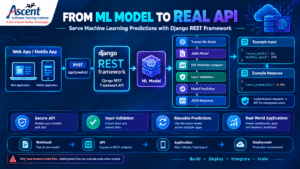
Django REST Framework machine learning model serving workflow from prediction API to JSON response
Use Django REST Framework to serve machine learning models through secure prediction APIs and JSON responses.

endpoint and return JSON. That turns a notebook experiment into something other applications can call.

python

# ml/views.py

from pathlib import Path

import joblib

from django.conf import settings

from rest_framework.decorators import api_view

from rest_framework.response import Response

from rest_framework import serializers

MODEL_PATH = Path(settings.BASE_DIR) / “ml_assets” / “churn_model.joblib”

model = joblib.load(MODEL_PATH)  # loaded once at import time, not per request

class PredictionInput(serializers.Serializer):

    tenure_months = serializers.IntegerField(min_value=0)

    monthly_spend = serializers.FloatField(min_value=0)

@api_view([“POST”])

def predict(request):

    s = PredictionInput(data=request.data)

    s.is_valid(raise_exception=True)

    d = s.validated_data

    proba = model.predict_proba([[d[“tenure_months”], d[“monthly_spend”]]])[0][1]

    return Response({“churn_probability”: round(float(proba), 3)})

Add ml to INSTALLED_APPS, and route it with path(“api/predict/”, predict) in config/urls.py. Building the path from settings.BASE_DIR means the model loads correctly wherever you run the server from.

With the settings above, POST requests need a valid token, so an anonymous call returns 401. Authenticated calls return:

json

{“churn_probability“: 0.999}

(The exact value depends on your model; ours was a toy model trained on six rows.) Invalid input returns a clear error:

json

{“tenure_months“: [“Ensure this value is greater than or equal to 0.”]}

For heavy or high-traffic inference, teams often move serving to FastAPI or a dedicated model server. Only load model files you trust: joblib and pickle files can execute code when loaded.

What should data science courses in Bangalore with placement teach about APIs?

A data science course worth its placement claim should teach you to ship models, not only train them: Python, SQL, statistics and ML, plus Git, API design and deployment. Serving a model through an endpoint separates a portfolio from a notebook.

Python full stack and data science share foundations: Python, SQL, Git and HTTP. An analyst who can expose a model as an API, or a full stack developer who can add a prediction endpoint, can work across more of a team’s needs.

Six questions to ask any data science course in Bangalore with placement, including ours:

  1. Does the syllabus include deployment (an API, Docker basics, a live demo), not only modeling?
  2. Will you build at least two portfolio projects with a GitHub repo you can show?
  3. Are SQL and statistics taught properly, or skimmed?
  4. How is “placement” defined? Ask about mock interviews, resume reviews and referrals, and ask which outcomes are documented and verifiable.
  5. Can you speak to former students and check their current roles on LinkedIn?
  6. Can you attend a demo class before paying?

If your goal is…

Start with

Add next

Backend or web developer role

Python full stack (Django + DRF)

Docker, cloud basics

Data analyst or ML role

Data science (Python, SQL, ML)

DRF or FastAPI for model serving

Undecided

Python + SQL fundamentals (shared by both)

Choose a track after one real project

What DRF skills do Bangalore employers look for?

Job descriptions for junior Python and Django roles commonly mention building REST APIs with DRF, authentication, a relational database through the Django ORM, Git, basic testing and the ability to read others’ code. Docker and cloud basics often appear as bonuses. Check current listings for the roles you want.

Bangalore’s tech employers are spread across the city: Outer Ring Road, Whitefield, Electronic City, and the Koramangala–HSR–BTM belt, among others. Skill requirements vary by company type, so read a few live job postings for your target role and compare them with what you can build today. For pay, use current listings and salary data on LinkedIn, Naukri and Glassdoor rather than any single institute’s figure.

A deployed project you can explain tends to carry more weight than a longer list of courses. A DRF API with auth, tests and a live URL gives you real answers to questions like: why this permission class, what happens with 100,000 rows, how did you test it?

Where can you find Python full stack training in BTM Layout?

Ascent Software Training Institute runs classroom Python full stack programs at 96, 2nd Floor, 100 Ft Ring Road, BTM 1st Stage, above Apollo Pharmacy and near the Mico Layout bus stop, Bangalore 560029. Weekday and weekend batches are available. Visit, sit in on a demo class and review the syllabus before paying.

See the Python full stack program in BTM Layout, the Python course syllabus (which lists Django REST Framework), and what past students say on Ascent’s reviews page.

Stuck on a step? Bring your code to a free demo class at Ascent, BTM 1st Stage.
Call 080-42191321 or 9035037886 · WhatsApp wa.me/919035037886 · Email hr@ascentcourses.com

How long does it take to learn DRF?

It depends on your starting point and how many hours you build each week. If you already know Python and basic Django, a focused four-week plan is enough to build, secure and test a CRUD API. Deployment and a portfolio project take additional practice beyond that.

A sample practice plan:

  1. Week 1: Django models, ORM, admin.
  2. Week 2: Serializers, ModelViewSet, routers.
  3. Week 3: JWT auth, permissions, pagination, filtering.
  4. Week 4: Tests, drf-spectacular docs, PostgreSQL.
  5. After week 4: Docker, deploying to a platform such as Render, Railway or AWS, and a project connected to a React front end.

Progress comes from the hours you spend building, not from the calendar. Mentor feedback can speed things up.

About Ascent

Ascent Software Training Institute has been running software training in Bangalore since 2005. Our classroom programs are at 96, 2nd Floor, 100 Ft Ring Road, BTM 1st Stage, above Apollo Pharmacy, Bangalore 560029. Call 080-42191321 or 9035037886, or email hr@ascentcourses.com.


FAQs

  1. What is Django REST Framework used for?


    It’s used to build web APIs in Python. Front-end apps, mobile apps and other services read and write data from a Django backend using JSON over HTTP, with built-in authentication, permissions, validation and pagination.
  2. Is Django REST Framework good for beginners?


    Yes, if you already know basic Python and Django. ModelSerializer and ModelViewSet let beginners build a working API quickly, and the browsable API makes testing easy. If you don’t know Django yet, learn that first.
  3. What is the difference between Django and Django REST Framework?


    Django is a full web framework that renders pages and manages databases. Django REST Framework is an add-on library that makes Django return structured data, usually JSON, for APIs. Most DRF projects use both together.
  4. What is a serializer in DRF?


    A serializer converts model instances into JSON for responses and validates incoming JSON before it becomes a model instance. It works like a form class, but for APIs.
  5. Should I use JWT or session authentication in DRF?


    Use JWT for separate front ends such as React or mobile apps, and session authentication for server-rendered or same-domain apps. Keep JWT access tokens short-lived and refresh them securely. Let your architecture decide, not trends.
  6. Is DRF or FastAPI better for getting a job in Bangalore?


    Neither guarantees a job. DRF appears in many Django codebases, which makes it useful for Python web roles, while FastAPI is popular for ML and microservices. Check current job listings for your target roles and learn the one they ask for first.
  7. Can I use Django REST Framework for data science projects?


    Yes. DRF can serve trained ML models as APIs, expose analytics to dashboards and connect data pipelines to web apps. For very high-throughput inference, teams may use dedicated model-serving tools.
  8. What should I look for in data science courses in Bangalore with placement?


    Look for a syllabus covering Python, SQL, statistics, ML and deployment, plus hands-on projects, trainers with industry experience, mock interviews and verifiable student outcomes. Ask how “placement” is defined and attend a demo class before enrolling.

Want your code reviewed by a trainer?

Join a free demo class at Ascent Software Training Institute, 96, 2nd Floor, 100 Ft Ring Road, BTM 1st Stage (above Apollo Pharmacy), Bangalore 560029, and ask for the Python full stack or data science syllabus walkthrough.

Call 080-42191321 or 9035037886 · WhatsApp wa.me/919035037886 · Email hr@ascentcourses.com

Not ready yet? Build the API above first, and come back with your questions.